Jim Bridger Days ’25 – Refreshing your Equipment

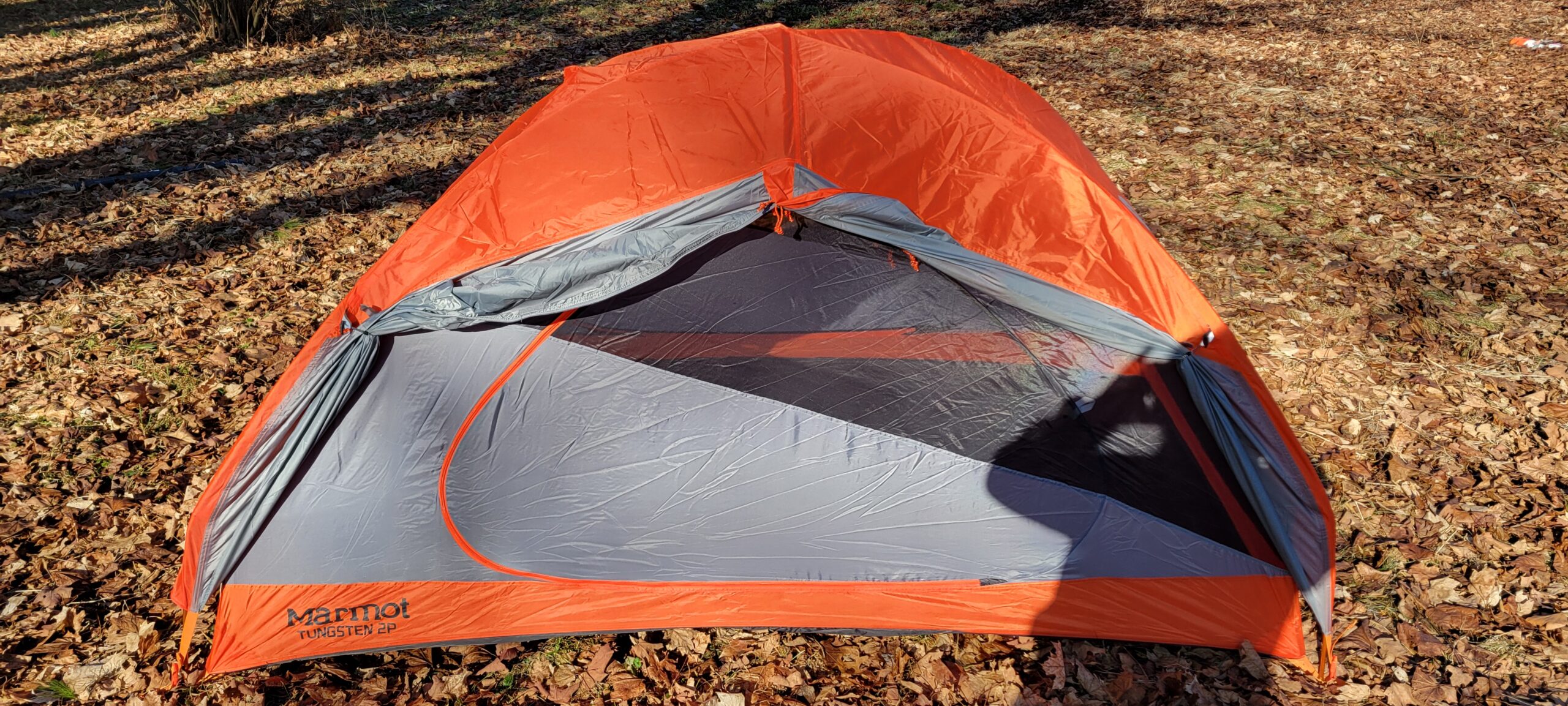
My Marmot Tungsten 2P

I love my two person tent.. It’s not just the fond memory of a waking up with a pack of coyotes sniffing around as my son and I were backpacking. It’s not just the fantastic and fast 3-pole deployment. It’s not just the logic and thought put into every facet from the footprint to the rainfly… It’s all of that put together that really puts this tent over the top.

Sure, it’s not huge, but we’ve got a Big Agnes Flying Diamond 6 for larger excursions (which we also love). This is just my solo or team tent, and for that it’s perfect sized. Lightweight and it checks all our boxes.

The construction is fantastic. It consists of simply two captive poles connected on a rotating pivot point, along with a third pole to add tension to the roof and give some more headroom. That not only makes it easy to setup, but easy to understand. When I popped it up to air it out this season, after having not touched it in the past couple of years, I got it setup solo without instructions in just around 10 minutes.

Sure, you could get by with a tarp and some branches to drape it over, but sometimes high quality equipment is the edge you need to reduce friction and get out there and get another trip under your belt.

Jim Bridger Days ’25 – Zeroing In

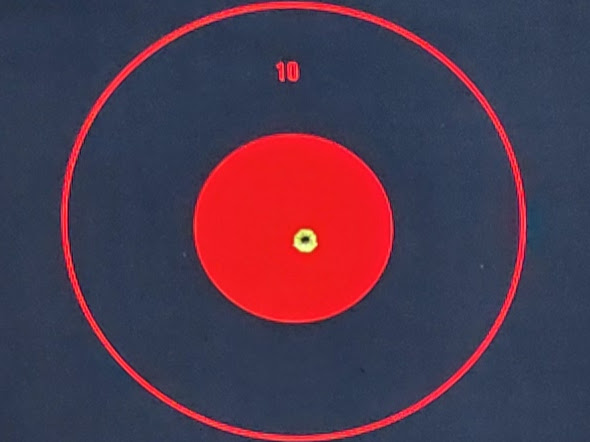
Bullseye on a fresh target at 50yards, can’t ask for much more than that..

Be prepared.

Yeah, it’s a Lion King number, but it also happens to be a motto I take seriously. Could you feed yourself, or your family, if there wasn’t ground beef in a freezer down the road, ready to be traded for your stacks of paper or a swipe of your plastic? Could you find, capture or kill game native in your area?

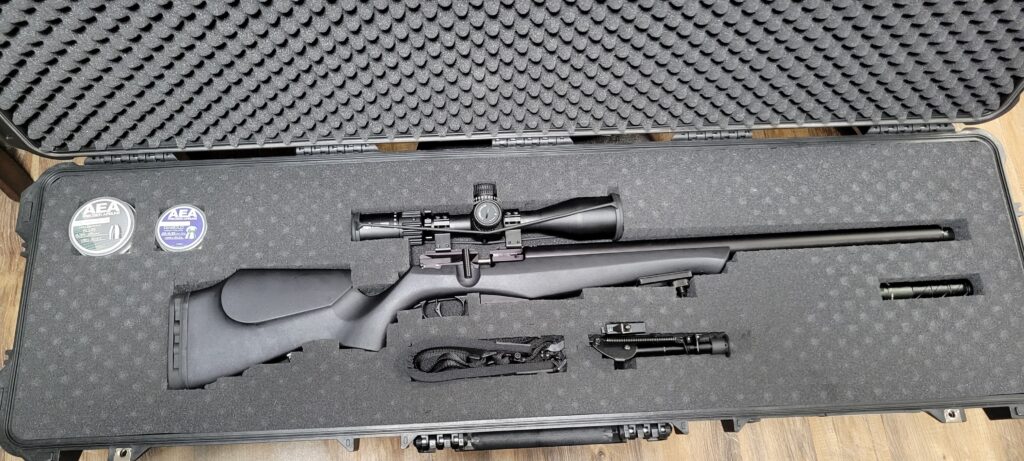
FX DRS Classic in .25 Caliber

That’s what the air rifle in the above image is all about. With proper shot placement and a 33.9gr Diabolo pellet, at ~45 ftlbs of energy, you can drop most backyard critters to keep your table catered. With some luck, coyote’s and even whitetail can be taken with a headshot.

The best part is, with a high quality Moderator (I’m running the DonnyFL Ryu) and a quickly improvised Target stand, you can get your scope zeroed and get in plenty of practice shots right in your backyard!

My hastily assembled target stand showing my son’s .177 Pellet grouping.

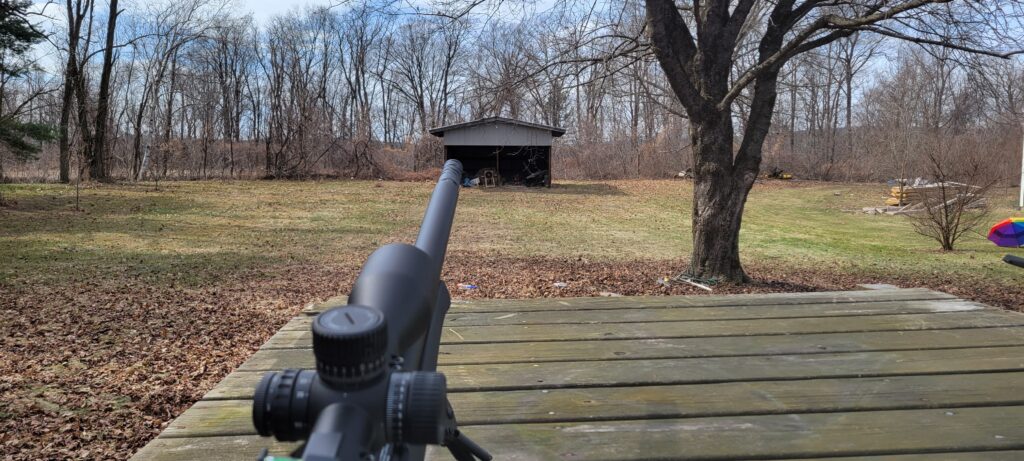
Shooting from a bipod without a rear rest means it took a handful of shots to really get my scope dialed in, but even on a gusty drizzly March afternoon in New England I was able to put out the following shot string at approximately 50 yards.

My target, the center Red sticker with my final 5 zeroed shots is 1″ in diameter.

That’s nothing to shake a stick at and easily “minute-of-squirrel” at the distances I’m looking to shoot at. Compare that to my son’s .177 pellet gun pattern above, which was able to get on target but had some serious trouble with the wind… And you’ll understand why I’m happy with the performance of my .25!

My second day “On the range” was gorgeous out, but still windy. 33.9g .25cal pellets didn’t care at all.

Overall, sighting in our pellet guns to get ready for some squirrel stalking was a great start to the outdoor season for us.

Jim Bridger Days ’25

Today is March 17th, Birthday of American mountain man, trapper, scout, and guide Jim Felix Bridger. Born in 1804 and orphaned at 13, Jim spent his life exploring the untamed wilderness of the American West.

Since 2018 and in recognition of the 77 years Jim spent trapping, hunting, and forging his way across the North American Frontier we celebrate the period of time from Jim’s birthday March 17th until the day of his death, July 17th, as ‘Jim Bridger Days’.

𝗧𝗵𝗲𝗿𝗲’𝘀 𝗻𝗼 𝘀𝗲𝘁 𝗱𝗲𝘀𝘁𝗶𝗻𝗮𝘁𝗶𝗼𝗻 𝗼𝗿 𝗴𝗮𝘁𝗵𝗲𝗿𝗶𝗻𝗴 𝗽𝗹𝗮𝗰𝗲, in fact, that would be fairly antithetical to our whole celebration. This isn’t burning man or some festival to exploit you with ticket fees… Instead, just load up your backpack and head outside the comfort of your living room for the weekend. Go for a hike, or a three day weekend camp out, if you’ve saved up some PTO go for a full improvised shelter and stories told by fire-light, or anything in-between!

In keeping spirit with the wild frontier and leaving civilization behind you, this event has no strict rules. To help you along we will however offer some suggestions:

  • Minimal electronics are suggested. Especially those with internet access. Try downloading or, even better, printing any maps, shelter plans, or activity instructions ahead of time. Then keep electronics off or in airplane mode. A camera or emergency phone can certainly elevate or even save you on a trip, while a 5G laptop or facebook connected cell phone can easily ruin one.
  • Leave your patch of wilderness the way you found it, or as close as reasonable possible. Build a fire pit? Fill it in. Eat a bag of jerky? Take the bag when you leave.
  • Bring friends!.. Sure, a huge festival with fried food stands and tacky trinkets isn’t what we are going for here… But even Jim only forged his way up the Missouri as part of William Henry Ashley’s “Hundred”. Friends, significant others, even kids can take you trip to the next level and cut camping chores in half! Just make sure your companions are along for the experience as well, if you drag someone along they will no doubt end up dragging you down.
  • Be prepared. You may wish to build a shelter onsite. Or rub two sticks together to spark a fire. But no plan survives a punch to the face (~Mike Tyson). It’s best to still bring supplies like a tarp and matches as plan B for when plan A falls through.
  • Know your local laws and limits. Activities like fishing and trapping are great fun and fantastic skills to practice, and if you’re lucky they can be a tasty pass-time. Just keep in mind that in 2025 those activities are largely regulated. It’s not worth a fine or a court date to avoid a class or license fee. Trapping, hunting, and fishing are all licensed activities in my own home state, please don’t get yourself in trouble.
  • Don’t drink the water! Even if the water source in front of you is moving, it may have been “stagnant” just upstream. Bring water and food sufficient for your trip, iodine/purification tablets, a life-straw, means to build a charcoal filter, anything other than sipping a stream/lake water. Unless you’re cool being hospitalized or worse. Freeze dried food is light and compact and won’t spoil if you don’t end up using it, but if you aren’t successful with your back-country hunting and fishing, it just might save your life..
  • Relax and have fun!

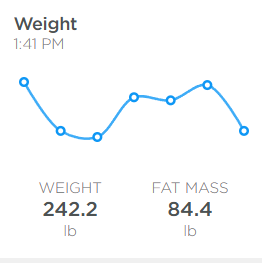
245.9

I used to say that anyone that hits 200lbs and doesn’t see that as a warning sign, an indication they need to change something in their life, just doesn’t care about their weight. Well, today I stepped on the scale and smiling back at me in bright OLED glory was the figure 245.9lbs… A far sight over that 200lb warning limit.

So, what do we do? Have I stopped caring about the scale, my appearance, my health? In some ways… Yes. Working from home and being in a long-term relationship severely moderates the positive benefits of physical appearance. Being in my 20’s and early 30’s insulated me from the effects of my weight on my health. With the visceral feedback of those elements of my life insulated from me, it was easy to dismiss the scale.

This Saturday though, I turn 35. A child no more, save in the eyes of my Mother, and reality is finally cashing the checks my body has been writing. So it’s time for some accountability, and accounting, when it comes to my food intake.

With that in mind, no more free feeding. I will only be eating at set meal times. No more endless sugar or carbs, I’ll only be consuming proteins, veggies, and dairy if it accompanies a protein (or in my unsweetened coffee).

Let’s see how this goes.

Two More Fruit Trees

Planted two more fruit trees today, 4/28/2024. Both are multi-varietal and self-pollinating. So if they survive they should bear fruit.

Additionally, the Mcintosh and Red Delicious varieties can pollinate our existing Wolf River apple tree. One of the grafted branches is actually already in bloom..

The Van and Lambert cherries may be able to pollinate our existing Black Tartarian cherry tree as well.

We shall see.

Fermentations 2023

Now that we are back home and we *gasp* have an actual pantry/kitchen closet for the first time, I’ve gone ahead and harvested some veggies to kick off fermentation season 2023! This year I’m doing a large batch of store bought orange bell pepper and habenero, with a smaller (due to yield) batch of home grown Hungarian wax peppers and tomatillos.

I’m planning to combine those two post ferment to make a kind of hot salsa verde sauce.

Along with the staple hotsauce mixtures I’ve also got a gallon of Kombucha ripening up and waiting to be bottled for second fermentation shortly.

More progress updates to come…

Cyborg Augmentations v0.7 – Time Keeping

Clocks Suck

At least, human readable clocks do. There’s so many edge cases to account for and I haven’t even gotten into automatically adjusting my time zone for daylight savings…

Regardless, here’s the code I rapidly tossed together in an impromptu code sprint last night. It includes the following features so far:

  • WiFi connectivity.
  • RTC Synchronization over WiFi.
  • Output to an OLED via SPI.
  • Multiple displays/application states.
  • Input via a rotary encoder with rotation and button presses.

My next goals are as follows:

  • Decide on a battery solution to make the setup portable.
  • Build out the multiple application states to make them more robust and useful.
    • I should be able to manage this better by setting a minimum and maximum screen state, equal to the number of possible display states then having the rotation of the encoder be obfuscated as “left” or “right” and incrementing the screen state better.
  • Solve some more niche time keeping issues, like DST.
//Load the libraries and files we need..
#include <SPI.h>
#include <Wire.h>
#include <Encoder.h>
#include <Adafruit_SSD1306.h>
#include <Adafruit_GFX.h>
#include <WiFi101.h>
#include <WiFiUdp.h>
#include <DHT.h>
#include <RTCZero.h>
RTCZero rtc;
#include "arduino_secrets.h"
#include "bitmaps.h"

//Declare all of our variables..

//Everything used for the rotary encoder:
Encoder myEnc(1, 0);
#define SW 2
unsigned long lastButtonPress = 0;

//Everything Used for Screen
#define SCREEN_WIDTH 128  // OLED display width, in pixels
#define SCREEN_HEIGHT 64  // OLED display height, in pixels
#define OLED_3V 7
#define OLED_CS 8
#define OLED_DC 9
#define OLED_RESET 10
#define OLED_MOSI 11
#define OLED_CLK 12
Adafruit_SSD1306 display(SCREEN_WIDTH, SCREEN_HEIGHT,
                         OLED_MOSI, OLED_CLK, OLED_DC, OLED_RESET, OLED_CS);

//Everything used for DHT22 Temp/Humidty Sensor:
#define DHTPIN 3       // what pin we're connected to
#define DHTTYPE DHT22  // DHT 22  (AM2302)
DHT dht(DHTPIN, DHTTYPE);

//RTC Test Variables:
/* Change these values to set the current initial time */
const byte seconds = 1;
const byte minutes = 1;
const byte hours = 1;

int rssi = WiFi.RSSI();
int status = WL_IDLE_STATUS;
int year;
int month;
int day;
int screen = 1;
int line1 = 0;
int line2 = 8;
int line3 = 16;
int line4 = 24;
int line5 = 32;
int line6 = 40;
int line7 = 48;
int line8 = 56;
int artificialDelay = 2000;
unsigned long lastEpoch;
unsigned long hcurEpoch;
unsigned long tcurEpoch;
unsigned long bootTime;
float h;
float t;
//int hours;
//int minutes;
//int seconds;
//Needed for encoder:
long oldPosition = 100;

///////please enter your sensitive data in the Secret tab/arduino_secrets.h
char ssid[] = SECRET_SSID;  // your network SSID (name)
char pass[] = SECRET_PASS;  // your network password (use for WPA, or use as key for WEP)
int keyIndex = 0;           // your network key Index number (needed only for WEP)

//Set the local timezone offset from GMT
// Eastern Standard Time (EST) = GMT-5
//Eastern Daylight Time (EDT) = GMT-4
const int TIMEZONE = -4;

void setup() {
  pinMode(SW, INPUT_PULLUP);
  pinMode(OLED_3V, OUTPUT);
  digitalWrite(OLED_3V, HIGH);
  Serial.begin(115200);
  display.begin(SSD1306_SWITCHCAPVCC, 0x3C);
  display.clearDisplay();
  display.setTextSize(1.5);
  display.setTextColor(SSD1306_WHITE);
  display.setCursor(8, line1);
  display.println("Cyborg Augmentation");
  display.setCursor(48, line2);
  display.println("v0.7");
  display.setTextSize(1);
  display.setCursor(32, line4);
  display.print("Booting...");
  display.display();
  dht.begin();
  delay(artificialDelay);

  // attempt to connect to WiFi network:

  while (status != WL_CONNECTED) {
    display.setCursor(12, line6);
    display.print("WiFi Connecting...");
    display.display();

    Serial.print("Attempting to connect to SSID: ");
    Serial.println(ssid);

    // Connect to WPA/WPA2 network. Change this line if using open or WEP network:

    status = WiFi.begin(ssid, pass);

    // wait 10 seconds for connection:
    delay(10000);
  }

  // you're connected now, so print out the status:

  rtc.begin();

  unsigned long epoch;

  int numberOfTries = 0, maxTries = 20;

  do {
    display.setCursor(0, line8);
    display.print("Synchronizing Epoch..");
    epoch = WiFi.getTime();
    bootTime = epoch;
    numberOfTries++;
    display.display();
    delay(artificialDelay);
  }

  while ((epoch == 0) && (numberOfTries < maxTries));

  if (numberOfTries == maxTries) {

    Serial.print("NTP unreachable!!");

    while (1)
      ;

  }

  else {

    Serial.print("Epoch received: ");

    Serial.println(epoch);

    rtc.setEpoch(epoch);

    Serial.println();
  }
}
int monthDays(int y, int m) {
  // Fourth, eleventh, ninth, and sixth,
  // thirty days to each we fix.
  if ((m == 4) || (m == 11) || (m == 9) || (m == 6)) return 30;
  // Every other, thirty-one,
  // except the second month alone,
  if (m != 2) return 31;
  // which hath twenty-eight, in fine,
  // till leap-year give it twenty-nine.
  if ((y % 400) == 0) return 29;  // leap year
  if ((y % 100) == 0) return 28;  // not a leap year
  if ((y % 4) == 0) return 29;    // leap year
  return 28;                      // not a leap year
}
void print2digits(int number) {
  if (number < 10) {
    display.print("0");  // print a 0 before if the number is < than 10
  }
  display.print(number);
}
void printWifi() {
  //Print the current WiFi Status:
  display.setCursor(0, 0);
  display.print("WiFi State:");
  display.println(WiFi.status());
  rssi = WiFi.RSSI();
  if (rssi == -100) {
    rssi = 0;
  }
  display.setTextColor(SSD1306_WHITE);
  display.setCursor(76, 0);
  display.setTextSize(1);
  display.print(rssi);
  display.println("dBm");
  if (rssi >= -55 && rssi < 0) {
    display.drawBitmap(112, 0, wifiSymbolExcellent, 16, 8, SSD1306_WHITE);
  }
  if (rssi < -55 && rssi >= -67) {
    display.drawBitmap(112, 0, wifiSymbolGood, 16, 8, SSD1306_WHITE);
  }
  if (rssi < -67 && rssi >= -90) {
    display.drawBitmap(112, 0, wifiSymbolBad, 16, 8, SSD1306_WHITE);
  }
  if (rssi < -90 || rssi == 0) {
    display.drawBitmap(112, 0, wifiSymbolNone, 16, 8, SSD1306_WHITE);
  }
}
void printTime() {
  int localHours = rtc.getHours() + TIMEZONE;  // add timezone offset
  int minutes = rtc.getMinutes();
  int seconds = rtc.getSeconds();
  if (localHours < 0) {  // handle negative values
    localHours += 24;
  } else if (localHours >= 24) {  // handle values over 23
    localHours -= 24;
  }
  display.print("Local Time: ");
  if (localHours > 12) {
    print2digits(localHours - 12);
  } else {
    print2digits(localHours);
  }
  display.print(":");
  print2digits(rtc.getMinutes());
  display.print(":");
  print2digits(rtc.getSeconds());
  if (localHours < 12) {
    display.println("am");
  } else {
    display.println("pm");
  }
}
void printDate() {
  year = rtc.getYear();
  month = rtc.getMonth();
  if (rtc.getHours() > 24 - TIMEZONE) {
    day = (rtc.getDay() - 1);
  } else {
    day = rtc.getDay();
  }
  display.print("Local Date: ");
  print2digits(month);
  display.print("/");
  if (rtc.getHours() > 24 - TIMEZONE && rtc.getDay() > 1) {
    print2digits(day - 1);
  }
  if (rtc.getHours() + TIMEZONE < 0 && rtc.getDay() == 1 && rtc.getMonth() > 1) {
    print2digits(monthDays(rtc.getYear(), rtc.getMonth() - 1));
  }
  if (rtc.getHours() + TIMEZONE < 0 && rtc.getDay() == 1 && rtc.getMonth() == 1) {
    print2digits(31);
  } else {
    print2digits(day);
  }
  display.print("/");
  print2digits(year);
  display.println(" ");
}
void printHumid() {
  hcurEpoch = rtc.getEpoch();

  if (hcurEpoch >= lastEpoch + 10) {
    display.setCursor(0, line8);
    display.println("Reading DHT...");
    float h = dht.readHumidity();
    lastEpoch = hcurEpoch;
  }
  display.setCursor(0, line6);
  display.print("Humid:");
  display.println(h);
  // Check if any reads failed and exit early (to try again).
  if (isnan(h)) {
    display.setCursor(0, line8);
    display.println("DHT sensor Failed!");
    return;
  }
}
void printTemp() {
  tcurEpoch = rtc.getEpoch();
  if (tcurEpoch >= lastEpoch + 10) {
    display.setCursor(0, line8);
    display.println("Reading DHT...");
    float t = dht.readTemperature();
    lastEpoch = tcurEpoch;
  }
  display.setCursor(72, line6);
  display.print("Temp:");
  display.println(t);
  // Check if any reads failed and exit early (to try again).
  if (isnan(t)) {
    display.setCursor(0, line8);
    display.println("DHT sensor Failed!");
    return;
  }
}
void printBoot() {
  display.print("Runtime:");
  display.println(rtc.getEpoch() - bootTime);
}
void manageWiFi() {
  display.setCursor(8, 40);
  if (WiFi.status() == 3) {
    WiFi.end();
    display.println("WiFi Disconnected");
  } else if (WiFi.status() == 0) {
    WiFi.begin(ssid, pass);
    display.println("WiFi Connecting");
  }
  display.display();
}

//Do the cool stuff:
void loop() {
  if (screen == 1) {
    display.clearDisplay();
    display.setTextColor(SSD1306_WHITE);
    display.setCursor(0, line1);
    printWifi();
    display.setCursor(0, line3);
    printTime();
    display.setCursor(0, line4);
    printDate();
    display.setCursor(0, line6);
    printHumid();
    printTemp();
    display.display();
  }
  if (screen == 2) {
    display.clearDisplay();
    display.setCursor(0, line1);
    display.print("Current RTC Epoch");
    display.setCursor(0, line2);
    display.print(rtc.getEpoch());
    display.setCursor(0, line8);
    printBoot();
    display.display();
  }

  //Rotary Loop:
  long newPosition = myEnc.read();
  if (newPosition > oldPosition) {
    oldPosition = newPosition;
    screen = 2;
    Serial.print("screen:");
    Serial.println(screen);
  }
  if (newPosition < oldPosition) {
    oldPosition = newPosition;
    screen = 1;
    Serial.print("screen:");
    Serial.println(screen);
  }

  int btnState = digitalRead(SW);
  if (btnState == LOW) {
    //if 50ms have passed since last LOW pulse, it means that the
    //button has been pressed, released and pressed again
    if (millis() - lastButtonPress > 50) {
      manageWiFi();
    }

    // Remember last button press event
    lastButtonPress = millis();
  }
}
Handy Dandy Robot Pals – Part 1: Planning

The goal for 2024 will be to create a household robot. One with actual utility that helps solve a household problem for me. Step 1? What do I even have for problems! In order to be useful and carry actual utilitarian merit (and thus justify paying to recharge it’s battery) I first need to identify some potential uses this robot could have.

Additionally, and just as importantly, what is a robot? Sure I could slap a raspberry pi in front of my washer to keep an eye on it and tell me when the tone goes off to indicate it’s done… I’ve done that before.. But is that a “robot”, in the true sense of the term? To me it comes down to how the computer functions that makes it a full fledged robot, vs just a program. Think Roomba vs Gyrobot

  • Mobility:
    • Moves under it’s own power.
    • Moves as a result of it’s own logic.
  • Logic:
    • Reports battery status -or- recharges autonomously.
    • Detects if it’s function must be performed via enviromental sensors/inputs.

This will be a live document to track some potential use cases and robot attributes, as they occur to me.

Cyborg Augmentations v0.7 – Rebooting

Back to the drawing board (literally) and starting from scratch. I’d like to get a wearable that is actually functional and helpful in my day-to-day life by the end of the year (2023).

Here’s some of the functions I’m hoping to include:

  • Wifi or bluetooth to phone to access internet
  • Wristwatch/Timepiece
  • Alarm Clock/Task List Reminders
  • Meal Reminders
  • Consumption (Input) Tracking
  • Bathroom (Output) Tracking
  • Module system to add/update functionality.
  • 3D Printable Housing (FDM or Resin?)
  • WordPress or twitter posting.
  • Home Assistant Integration?
  • USB-C Charging

More to follow..